
Staging URLs Should Not Slow Down Testing
Odoo.sh staging instances are useful for testing upgrades, fixes, customizations, and configuration changes before they reach production. The friction appears when refreshed staging environments receive changing generated URLs and teams keep asking for the latest link.
Staging Links solves that small but repeated problem by keeping a permanent live-hosted redirect link that points users to the current staging instance.
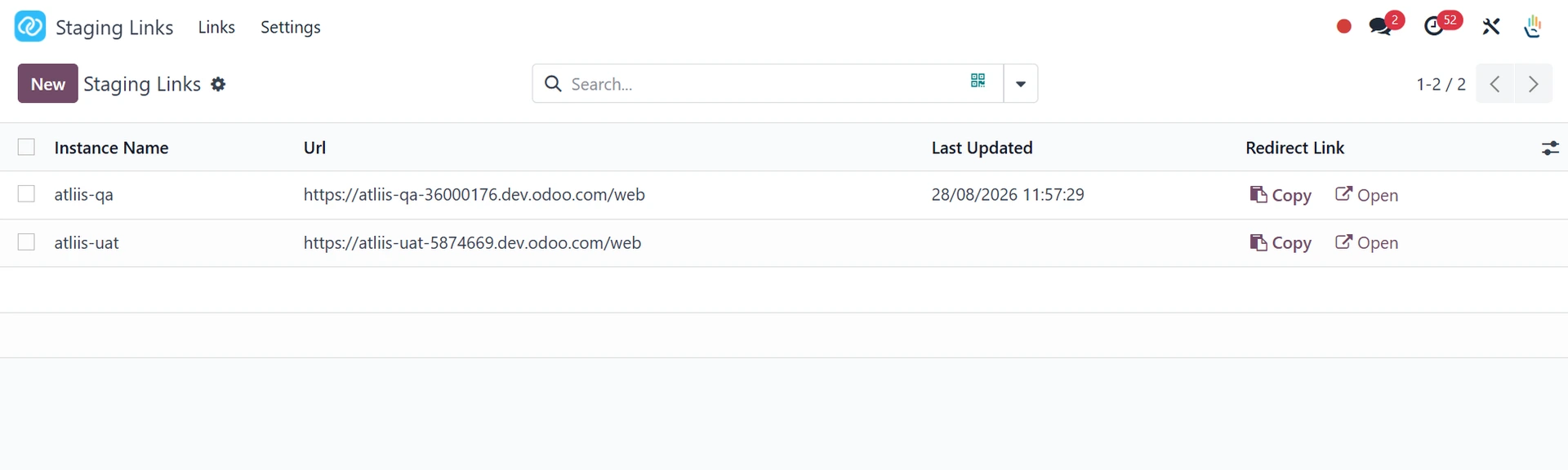
What Teams Notice First
Permanent Links
Share a stable link once and keep using it after future staging refreshes.
Automatic Updates
When the staging instance starts, it reports its current URL back to the live database.
Admin Control
Settings and link mappings stay in Odoo, with access limited to administrators.
Best Fit
This app is a strong fit for Odoo teams that use Odoo.sh staging environments for QA, client review, training, upgrade rehearsal, and implementation sign-off.
Instead of updating bookmarks, knowledge-base pages, tickets, and chat messages after every refresh, teams can point everyone to one stable redirect link.
How the Workflow Looks
Install the module
Install atliis_instance_redirect on the live Odoo database.
Configure staging settings
Open Settings > Staging Links, enter the live base URL, and add the service account credentials.
Refresh staging normally
Share the redirect link
Use the generated Staging Links URL anywhere your team needs a consistent staging destination.
Useful Places to Share Stable Links
- Implementation project plans and testing checklists.
- Support tickets, change requests, and issue trackers.
- Internal knowledge-base pages and release notes.
- Client review messages where the staging URL must stay easy to find.
Why This Helps During Odoo Projects
Staging environments are where teams inspect changes before committing to production. If the link changes often, reviewers lose time finding the right instance instead of reviewing the actual work.
A stable redirect gives project managers, consultants, developers, and customers a simpler habit: open the same link, land on the active staging instance, and keep the review moving.
Governance Tip
Keep staging redirect links clearly named. A simple convention such as customer, project, or environment name makes links easier to trust when multiple Odoo.sh projects are active.
Because mappings are managed from Odoo, administrators should also review service account access and stale links during project handover or go-live cleanup.
No External Redirect Service Required
The app listing notes that the module uses Odoo settings, controllers, and a URL mapping model. That keeps the redirect workflow close to the Odoo environment instead of adding another external tool just to manage staging bookmarks.
Explore Staging Links on Odoo Apps
See the full app listing, screenshots, version details, and installation information on the Odoo Apps Store.