
When Customers Need One Clean Invoice
Sometimes multiple customer invoices are already posted before a customer asks for a consolidated bill. Handling that request manually can create confusion around credit notes, duplicate lines, and audit history.
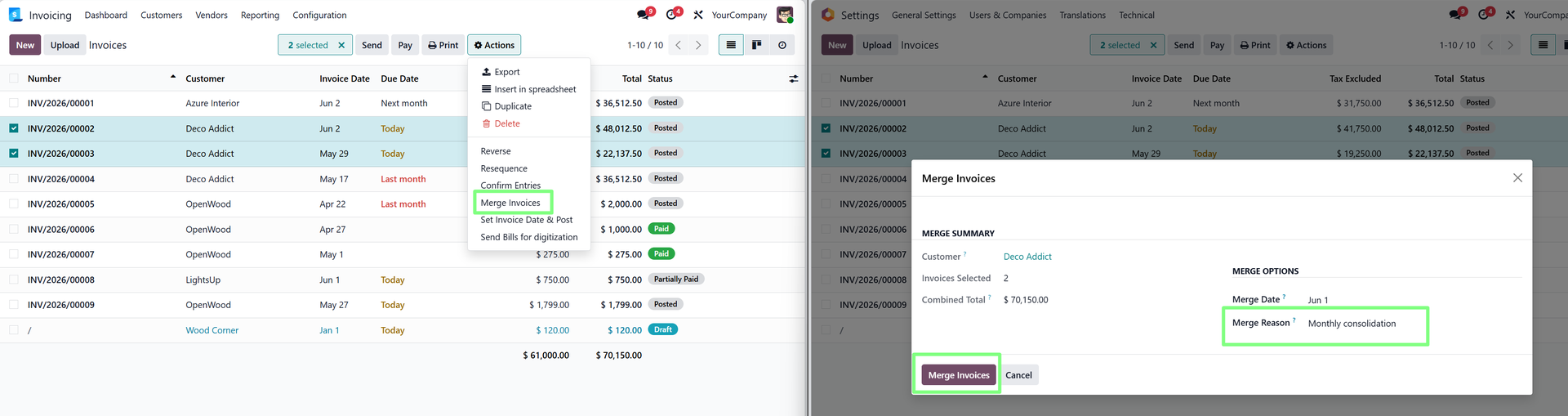
Merge Customer Invoices helps finance teams consolidate posted invoices into one cleaner invoice while keeping related adjustments and batch tracking visible.
Finance Controls That Matter
- Review which posted invoices are included in the merge.
- Confirm credit notes and line consolidation before sharing the final invoice.
- Use batch tracking to preserve a clearer audit trail.
Best Fit
This app is useful for accounting teams that regularly handle customer billing consolidation, invoice corrections, or cleanup after invoices have already been posted.
Example: Consolidating Customer Billing
A customer may receive several posted invoices and later request one consolidated invoice for internal processing. Finance teams can handle this manually, but the manual path can make credit notes and audit trails harder to follow.
With an invoice merge workflow, the accounting team can approach consolidation more systematically and preserve clearer batch history.
Review Points for Finance Teams
- Confirm all selected invoices belong to the correct customer and billing context.
- Review generated credit notes before finalizing the consolidated result.
- Keep supporting communication attached to the relevant invoice records.
Why Traceability Is the Main Point
Merging invoices is not only about producing a new customer-facing document. Finance teams also need to understand what happened to the original invoices and why any credit notes were created.
That is why batch tracking and audit visibility should be emphasized in the blog. The app helps with document cleanup, but its deeper value is keeping the accounting story understandable.
When Not to Use a Merge
If invoices belong to different customers, different legal entities, or materially different accounting contexts, the team should review the situation carefully before consolidation. The app supports the workflow, but finance policy should guide when the workflow is appropriate.
Customer Experience Angle
Invoice consolidation is often requested because customers need cleaner billing on their side. A clear merged invoice can make internal processing easier for the customer while still allowing the seller to preserve accounting traceability.
That balance between customer convenience and finance control is the strongest story for this app.
Explore Merge Customer Invoices on Odoo Apps
See the full app listing, screenshots, version details, and installation information on the Odoo Apps Store.