
Atliis Studio for Odoo
Learn how the Atliis Studio integration for Odoo helps teams open images from Odoo, edit them in a professional browser-based studio, and bring finished visuals back into their workflow.
Business visuals do not live in isolation. Product photos, marketing assets, catalog images, and campaign graphics often sit inside the same systems teams use to run daily operations.
That is why the Atliis Studio integration for Odoo is designed around a simple idea: users should be able to edit images where the work already happens.
With Atliis Studio connected to Odoo, teams can open an image from Odoo, edit it in a powerful browser-based studio, and bring the finished file back into their business workflow. The result is a smoother creative process for teams that manage products, websites, sales materials, or customer-facing content through Odoo.
Instead of downloading an image, editing it in a separate tool, saving a new version, and uploading it again, teams can move from source image to finished visual in a more connected flow.
Why This Integration Matters
Many business teams need visual content, but not every team has a designer available for every small edit. A product image may need a cleaner background. A campaign graphic may need updated text. A banner may need quick resizing or a visual refresh before it goes live.
Atliis Studio helps make those everyday edits easier. By bringing the editor closer to Odoo, users can reduce context switching and keep visual updates tied to the business records, assets, and workflows they already use.
How the Odoo Workflow Works
Open media from Odoo
Start with an image already stored or managed in your Odoo workflow, such as a product image, marketing asset, or page visual.
Edit in Atliis Studio
Use the Studio editor to adjust the image, add text or design elements, remove backgrounds, work with templates, and prepare the final visual.
Import the result back
Bring the finished file back into Odoo so the edited visual remains connected to the business process it supports.
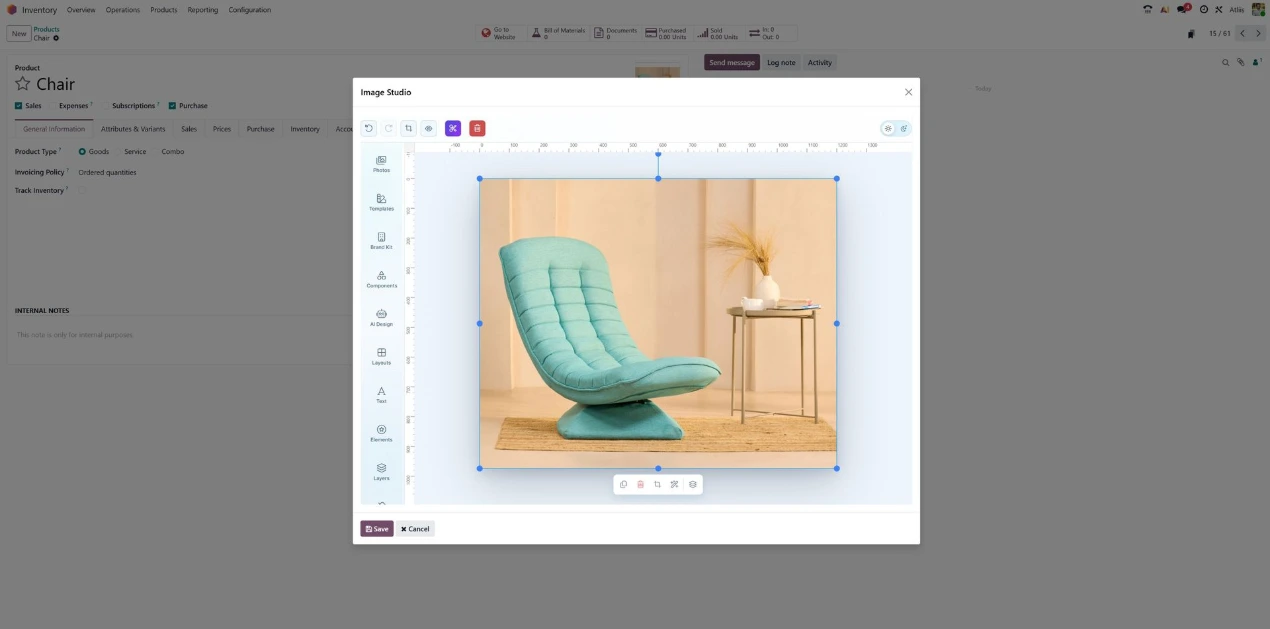
What Teams Can Create
The integration is useful anywhere business content and visual content meet. It gives teams a practical way to handle common image tasks without leaving the operational workflow.
Clean product images for catalogs, websites, and sales pages
Create social media visuals connected to business campaigns
Prepare banners and promotional graphics for website updates
Edit uploaded images with text, shapes, backgrounds, and brand elements
Remove backgrounds for sharper product and marketing visuals
Reuse templates and assets to keep content consistent
Export finished visuals for web, social, and internal business use
A Browser-Based Studio Inside a Business System
Atliis Studio is built as a browser-based editor, which makes it well suited for embedded and connected workflows. The editor can be launched inside another application experience, while API-key validation and embed configuration help keep the integration controlled.
Designed for Faster Visual Operations
The Atliis Studio and Odoo integration is not just about editing a single image. It is about helping teams move faster when visual work is part of a larger business process.
For product teams, that could mean cleaner catalog images. For marketing teams, it could mean faster campaign visuals. For operations teams, it could mean fewer manual steps between finding an image, improving it, and using it where it needs to go.
Atliis Studio gives Odoo users a connected way to create, edit, and return visuals without turning a small image task into a long workflow.
Ready to edit images directly from Odoo?
Use Atliis Studio to bring browser-based image editing, background removal, templates,
and export workflows closer to the business systems your team already uses.